
Grade what your agents did
Telemetry records the work. This page grades it. People rate turns, and a local model labels every call and every turn. Both land as Langfuse scores on the traces Grove exports.
- Ratings are ground truth. A person spots a wasted turn at once.
- Decision models label everything. One small model on your GPU scores every span.
- Four evaluators cover the common questions. Why each shell call ran, what each turn asked for, how the user reacted, and whether the answer fit.
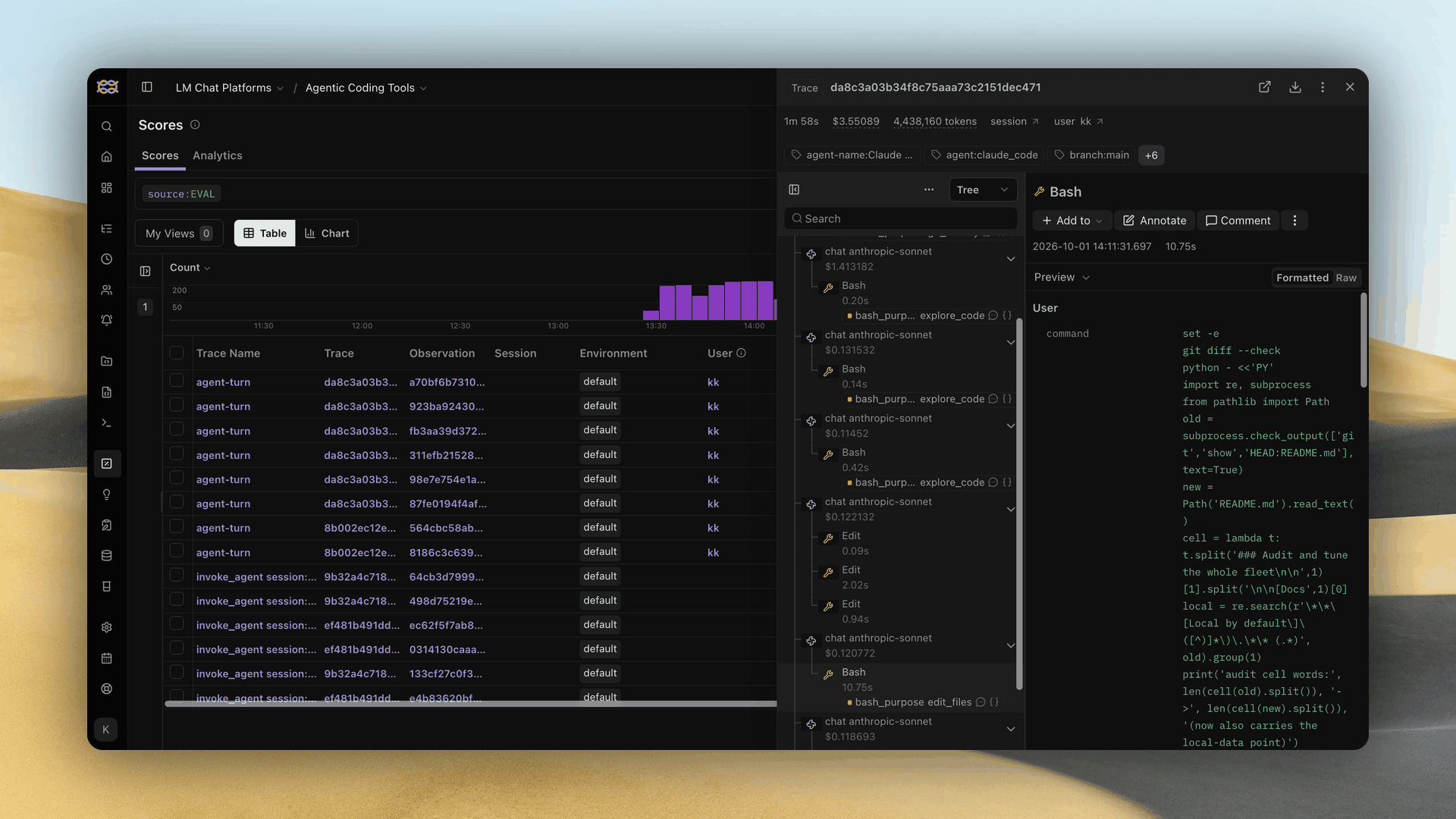
- Scores sit on the observation they judge. Filter, chart and alert on them together.
Rate a turn, and the rating lands on its trace
Every turn's final answer has Copy, thumbs up and thumbs down.
- A thumb asks why. Pick reasons, such as wasted steps or a missed goal, and add a note.
- The rating lands on that turn's trace as a
user-feedbackscore, plus oneuser-feedback-reasonoruser-feedback-praiseper reason. - Voting again replaces the old rating.
- The thumbs appear only when Langfuse is configured, so a rating always has a home.
Label every observation with a decision model
A decision model picks one option from your list and says how sure it is. It writes no text, so a call takes about a second on a local GPU.
- It sees one observation. Never its siblings, children or session.
- Each answer is a score. The comment names the runner-up, and
metadata.typesafeholds every option's probability. - It always answers. Give every list an
otheroption, or it picks the least wrong one. - The same input gets the same answer. Scores stay comparable from week to week.
Choose a model
Measured on one real fleet's shell calls, warm, one call at a time.
Start with Tev1 4B
It is the best balance of accuracy and speed. Only the model and your wording move accuracy, because the API has no reasoning setting.
Run the model
Ollama 0.35 or later serves decision models on /v1/systemone.
- Keep it loaded. A cold call takes up to ten seconds. Set
OLLAMA_MAX_LOADED_MODELSso agent models never evict it. - Only Tev and Nimble work. Ollama refuses other architectures here.
- Jev speaks the same API from TypeSafe's cloud. Point the Langfuse connection at it instead of Ollama.
- Mask sensitive fields before using Jev. Every observation you score is sent to TypeSafe.
The recommended evaluators
Four evaluators, each answering one question a team asks every week. Each section links a ready request file with the full question.
| Evaluator | Question it answers | Scores | Agreement |
|---|---|---|---|
| Shell call purpose | Why did the agent run this command? | Every shell call | 89% of 120 |
| Turn intent | What did the user ask for? | Every turn | 87% of 84 |
| User agreement | Did the user say the agent went wrong? | Every turn | 80% of 84 |
| Answer relevance | Did the final reply address the request? | Every turn | 93% of 57 |
- Agreement is against hand labels from one fleet's real traffic. Yours will differ, so calibrate before trusting a number.
- The three turn evaluators share one rule. Langfuse runs them side by side on each turn.
- Langfuse's out-of-scope template is left out. It suits a public assistant, and a coding fleet rarely gets off-topic work.
Shell call purpose
Grove records every shell call the same way for Claude Code and Codex. This evaluator reads the command and the agent's stated reason, then picks one of 18 purposes.
Parameters
| Parameter | Value |
|---|---|
| Score name | shell_purpose, categorical |
| Question type | Choice |
| State | tool_call mapped to the observation's Input |
| Rule filter | type is TOOL, and metadata grove_tool_category is shell |
| Request file | shell-purpose-request.json |
- Labels name an intent, not a program.
python3can edit a file or query an API. - A compound command counts by its main step, not by
cdorenv. - The agent's own description wins. Nearly every Grove shell call carries one.
Options
| Purpose | When it applies |
|---|---|
explore_code |
Read or search code, docs or config. |
edit_files |
Change source, doc or test files. |
run_tests |
Run tests and read the result. |
lint_typecheck_build |
Lint, type check, generate or build. |
git_history |
Status, diff, commit, rebase, worktrees. |
forge_collab |
Push, pull requests, issues, CI runs. |
service_ops |
Start, stop or deploy services. |
diagnose_runtime |
Logs, health and processes of a live system. |
data_query |
Query a database or data API. |
secrets_config |
Credentials, env vars, tool config. |
dependency_env |
Install or inspect packages. |
agent_fleet |
Coordinate the agent platform. |
web_fetch_research |
Fetch docs or web pages. |
wait_poll |
Wait for CI or a job. |
cleanup_scratch |
Remove temp files and probes. |
visual_verify |
Screenshots, renders, layout checks. |
compute_analyze |
A quick calculation over local data. |
other |
None of the above. |
How teams use it
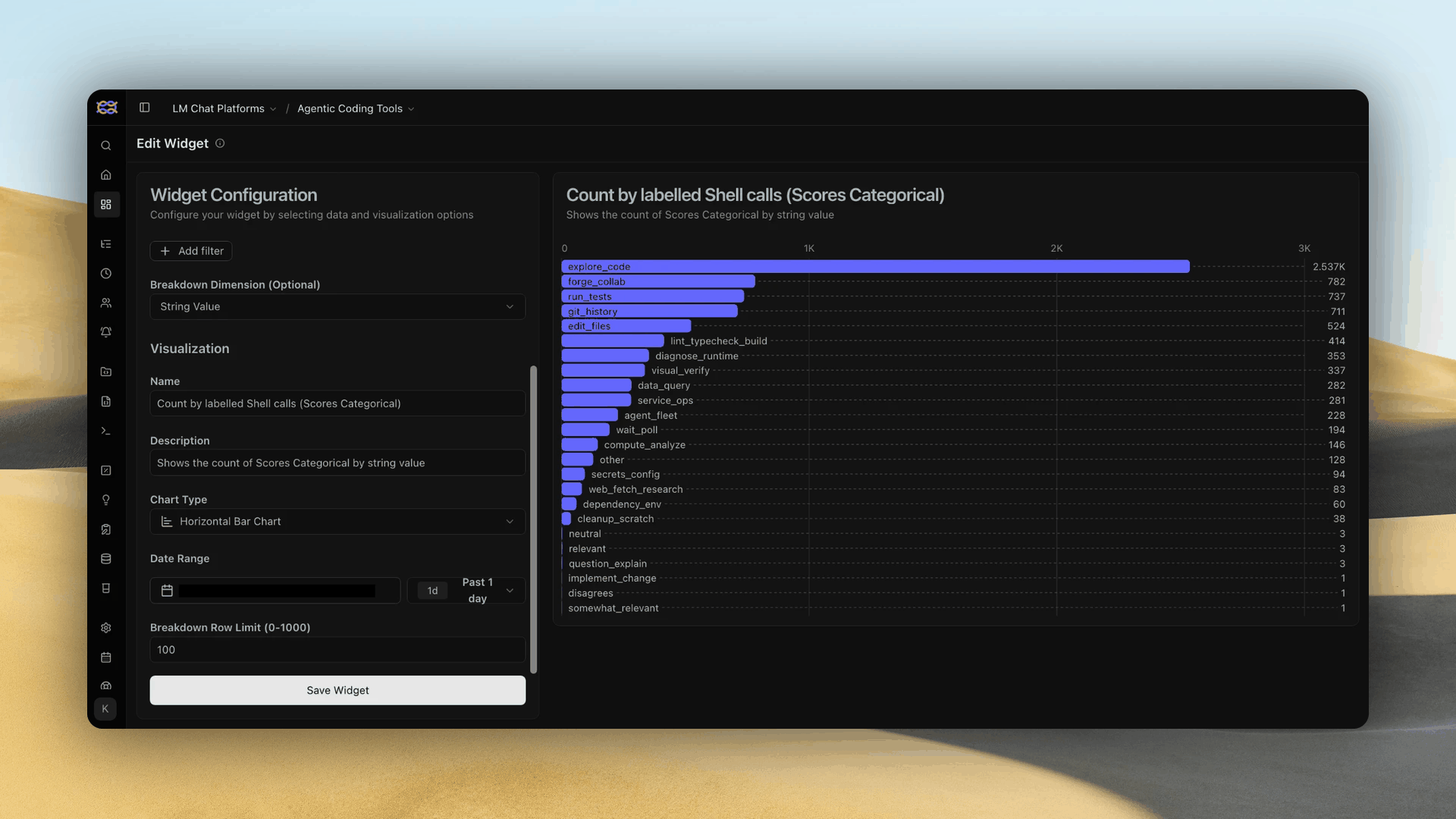
Join the purpose with the duration and grove_shell_outcome Grove already records. Four days of one fleet, about 7,700 calls, gave these answers.
-
Chart the mix on a dashboard. Add a widget over Scores Categorical, broken down by string value, as a horizontal bar chart. Filter on the score name so turn labels stay out.
-
Find where shell time goes. Tests were 9% of calls and 52% of shell time. That is where a faster suite pays off first.
- Find which work fails. Installs and cleanup failed one call in seven, against one in 24 overall. Those are the setup steps to script.
- See how agents read code. A third of calls only read files through the shell. Better search tools cut that.
- Compare harnesses and repos. Split by
grove_agent_kindorgrove_repoto see who tests, who explores and who waits. - Watch
other. It sat under 2%. A growing share means a purpose is missing from the list.
Trust the confidence
Right answers averaged 0.86 confidence, wrong ones 0.62. Review anything under 0.6.
Turn intent
This evaluator reads the user's message that opened a turn and names what they wanted.
Parameters
| Parameter | Value |
|---|---|
| Score name | intent, categorical |
| Question type | Choice |
| State | input mapped to the observation's Input |
| Rule filter | traceName is agent-turn, type is AGENT, and it is the root observation |
| Request file | turn-intent-request.json |
- It labels the request, not the work. Pair it with a rating or a relevance score to judge the outcome.
- Turns another agent started are scored too. No filter tells them apart yet.
Options
| Intent | When it applies |
|---|---|
implement_change |
Build or change code, UI, behaviour or config. |
fix_bug |
Something is broken. Find the cause and fix it. |
question_explain |
Explain how or why, with no change asked for. |
status_check |
Ask about progress or what already happened. |
git_release |
Commit, push, pull request, merge or release. |
ops_infra |
Operate hosts, services, CI runners or credentials. |
docs_writing |
Write or edit documentation or prose. |
planning_tracking |
Create or organize issues, specs or plans. |
orchestration |
Manage workspaces, sub-agents or watches. |
approval_go_ahead |
Approve a proposal or say carry on. |
context_provision |
Supply information or files, with no new request. |
other |
Small talk, a test ping, or none of the above. |
How teams use it
- See what your team asks agents for. A week of intents per repo shows whether agents build, fix or mostly answer questions.
- Find the work agents do badly. Filter thumbs-down turns by intent. A cluster on one intent is the skill to improve.
- Count the hand-holding. A high share of
status_checkandapproval_go_aheadmeans people are watching agents instead of delegating. - Trust the work labels most.
implement_change,fix_bug,ops_infraandorchestrationwere never wrong in calibration.status_check,question_explainandplanning_trackingwere right only half to two thirds of the time.
User agreement
This evaluator reads the user's message and asks whether it judges the agent's previous work.
Parameters
| Parameter | Value |
|---|---|
| Score name | user_agreement, categorical |
| Question type | Choice |
| State | input mapped to the observation's Input |
| Rule filter | The turn filter above |
| Request file | user-agreement-request.json |
- It reads the next message, not the reply. A
disagreeson turn five is a verdict on turn four. - It costs no human effort. It catches the corrections people type but never rate.
Options
| Reaction | When it applies |
|---|---|
disagrees |
The user says the agent made a mistake, misunderstood or went the wrong way. |
agrees |
The user approves, confirms success or says go ahead. |
neutral |
A new request or information, with no judgement of the last answer. |
How teams use it
- Track corrections over time. The
disagreesshare per week is a quality line that needs no ratings. - Review the turn before each
disagrees. That turn is the miss, and it is where a prompt or skill fix starts. - Compare before and after a change. A new model or instruction should lower the
disagreesshare. - Ignore
agreesfor now. It was right only one time in three. People often approve and ask for something new in one message.
Answer relevance
This evaluator reads the user's request beside the agent's final reply and asks whether the reply addresses it.
Parameters
| Parameter | Value |
|---|---|
| Score name | answer_relevance, categorical |
| Question type | Choice |
| State | user_request mapped to Input, and assistant_output mapped to Output |
| Rule filter | The turn filter above |
| Request file | answer-relevance-request.json |
- It judges the final reply only. It never sees the steps the agent took in between.
- A short progress note can read as off-topic. One reply in five was under 200 characters.
Options
| Relevance | When it applies |
|---|---|
relevant |
Addresses the request, covers all its parts and stays on topic. |
somewhat_relevant |
Addresses part of it but misses a requirement or a next step. |
not_relevant |
Off-topic, evasive or unrelated to the request. |
How teams use it
- Queue misses for review. On one fleet, 15% of turns scored
not_relevant. Start with the most confident ones. - Alert on a jump. A rising
not_relevantshare after a model or prompt change is an early regression signal. - Split by harness. Group by
grove_agent_kindto compare Claude Code and Codex on the same kind of work. - Combine with intent. Relevance per intent shows which kinds of request agents answer worst.
Calibrate on your own fleet
Your agents are not ours. Test each list on your own traffic before trusting a number.
- Sample 100 to 150 observations from a few days.
- Label each one yourself.
- Replay each through the model with the matching request file.
- Read the misses. Overlap means sharper wording. Misses in
othermean a new option. - Compare item by item. A higher total can hide a regression.
curl -s http://localhost:11434/v1/systemone \
  -H 'Content-Type: application/json' \
  --data-binary @docs/examples/shell-purpose-request.json
- Swap
statefor your own observation. Keep the questions as they are. - Send it from a file. Inline quoting breaks on the backticks.
Set up an evaluator
Five steps take a request file to a score on every matching observation. Steps 2 and 3 happen in the Langfuse UI, and the CLI covers the rest.
export LANGFUSE_HOST=https://langfuse.example.com
export LANGFUSE_PUBLIC_KEY=pk-lf-...
export LANGFUSE_SECRET_KEY=sk-lf-...
Two steps need the UI
Langfuse 4.48's API refuses the typesafe adapter and decision-model evaluators. Rules and scores work from the CLI.
1. Check the model answers
Send a request file from a host the Langfuse worker can reach, not only from your laptop.
curl -s http://ollama-host:11434/v1/systemone \
  -H 'Content-Type: application/json' \
  --data-binary @docs/examples/shell-purpose-request.json \
  | jq '.answers[] | {choice, confidence}'
- Expect
git_historywith a confidence near 0.97. The example call fetchesmainand lists what landed. - The turn files answer
fix_bug,disagreesandrelevant. - A connection error here fails every evaluation later. The worker retries for about two hours, then marks the job as an error.
2. Add the connection
Open Settings, then LLM Connections, and add one connection. Every evaluator shares it.
- Adapter:
typesafe. Base URL:http://ollama-host:11434/v1. Custom model:tev1:4b. - API key: any placeholder, because Ollama ignores it.
3. Create the evaluator
Open Evaluators, choose New evaluator, then New decision model evaluator. Print the question text to paste in.
jq -r '.questions[] | .instructions, "",
  (.criteria | to_entries[] | "\(.key): \(.value)")' \
  docs/examples/shell-purpose-request.json
- Question: type Choice, the instructions as its text, and one option per printed line.
- Score name and state: copy them from the evaluator's Parameters table above.
- Test it on a real observation before saving. The evaluator's URL ends in its id, which step 4 needs.
4. Attach a rule
The rule picks which observations the evaluator scores. Shell calls need one rule.
langfuse api evaluation-rules create --name "Shell call purpose" --enabled \
  --evaluator-assignments '{"evaluatorId":"<shell-evaluator-id>"}' \
  --filter '{"type":"stringOptions","column":"type","operator":"any of","value":["TOOL"]}' \
  --filter '{"type":"stringObject","column":"metadata","key":"grove_tool_category","operator":"=","value":"shell"}'
The three turn evaluators share a second rule on each turn's root.
langfuse api evaluation-rules create --name "Turn evaluators" --enabled \
  --evaluator-assignments '{"evaluatorId":"<intent-id>"}' \
  --evaluator-assignments '{"evaluatorId":"<agreement-id>"}' \
  --evaluator-assignments '{"evaluatorId":"<relevance-id>"}' \
  --filter '{"type":"stringOptions","column":"traceName","operator":"any of","value":["agent-turn"]}' \
  --filter '{"type":"stringOptions","column":"type","operator":"any of","value":["AGENT"]}' \
  --filter '{"type":"boolean","column":"isRootObservation","operator":"=","value":true}'
- A rule scores observations from now on. Earlier ones stay unscored.
- Add
--sampling 0.1to score one in ten. The default scores every match. - An occasional
Internal Server Errorcreates nothing. Run the same command again.
5. Watch the scores arrive
The first scores land within a minute of the next matching observation.
- Each score is one label. Its comment reads like
run_tests (p=0.67); confidence 0.67; runner-up other (0.24). - No scores after a few calls? Open the evaluator. Langfuse blocks it when the model is missing or the host does not resolve.
Registering the feedback rubrics
Create these three score configs once per project, before anyone rates a turn. Use the Langfuse CLI with Grove's credentials.
langfuse api score-configs create --name user-feedback --data-type BOOLEAN \
  --description "Human thumbs up or down on one agent turn"

langfuse api score-configs create --body-json '{
  "name": "user-feedback-reason",
  "dataType": "CATEGORICAL",
  "description": "Why a human rated an agent turn down",
  "categories": [
    {"label": "Unnecessary actions", "value": 0},
    {"label": "Unnecessary testing", "value": 1},
    {"label": "Wasted time", "value": 2},
    {"label": "Ran slow commands without need", "value": 3},
    {"label": "Cluttered the context", "value": 4},
    {"label": "Missed the goal", "value": 5}
  ]
}'
langfuse api score-configs create --body-json '{
  "name": "user-feedback-praise",
  "dataType": "CATEGORICAL",
  "description": "Why a human rated an agent turn up",
  "categories": [
    {"label": "Reached the goal directly", "value": 0},
    {"label": "No wasted steps", "value": 1},
    {"label": "Tested only what mattered", "value": 2},
    {"label": "Clear explanation", "value": 3},
    {"label": "Stayed in scope", "value": 4}
  ]
}'
- The names and types are fixed. Grove looks each config up by name.
- Labels must match
telemetry.feedback_reasonsandtelemetry.positive_feedback_reasonsexactly. Change both together.
See also
- Agent telemetry and tracing: the traces these scores attach to.
- Langfuse: Jev as a judge: question types and limits.
- Configuration reference: the
telemetry.feedback_reasonskeys.